How to Use a Temp Mail for Tik Tok to Create Accounts Privately
How to Use a Temp Mail for Tik Tok to Create Accounts Privately
TikTok has become the ultimate hub for entertainment, trends, and creativity. However, creating a new account often requires you to share personal information, such as your primary email address or phone number. If you value your online privacy or simply want to create a secondary "ghost" or lurker account without flooding your real inbox with notifications, using a temp mail for tik tok is the smartest solution.
In this guide, we will walk you through exactly why and how to use a temporary email generator to set up a fully functional TikTok profile in less than a minute.
Why Should You Use a Temp Mail for Tik Tok?
Before jumping into the steps, let’s look at the main benefits of using a temporary disposable email for your social media accounts:
- Spam Prevention: Social media platforms love sending daily digest emails, notifications, and marketing updates. A temporary email keeps your real inbox clean.
- Enhanced Privacy: Protect your digital identity from potential data leaks or tracking across different platforms.
- Effortless Secondary Accounts: Whether you need a separate account for business testing, market research, or just scrolling anonymously, you don’t need to go through the hassle of creating a new Gmail or Yahoo account.
Step-by-Step Guide: Creating a TikTok Account with Temp MailQ
Using Temp MailQ to register on TikTok is incredibly straightforward. Just follow these simple steps:
Step 1: Get Your Free Temporary Email Address
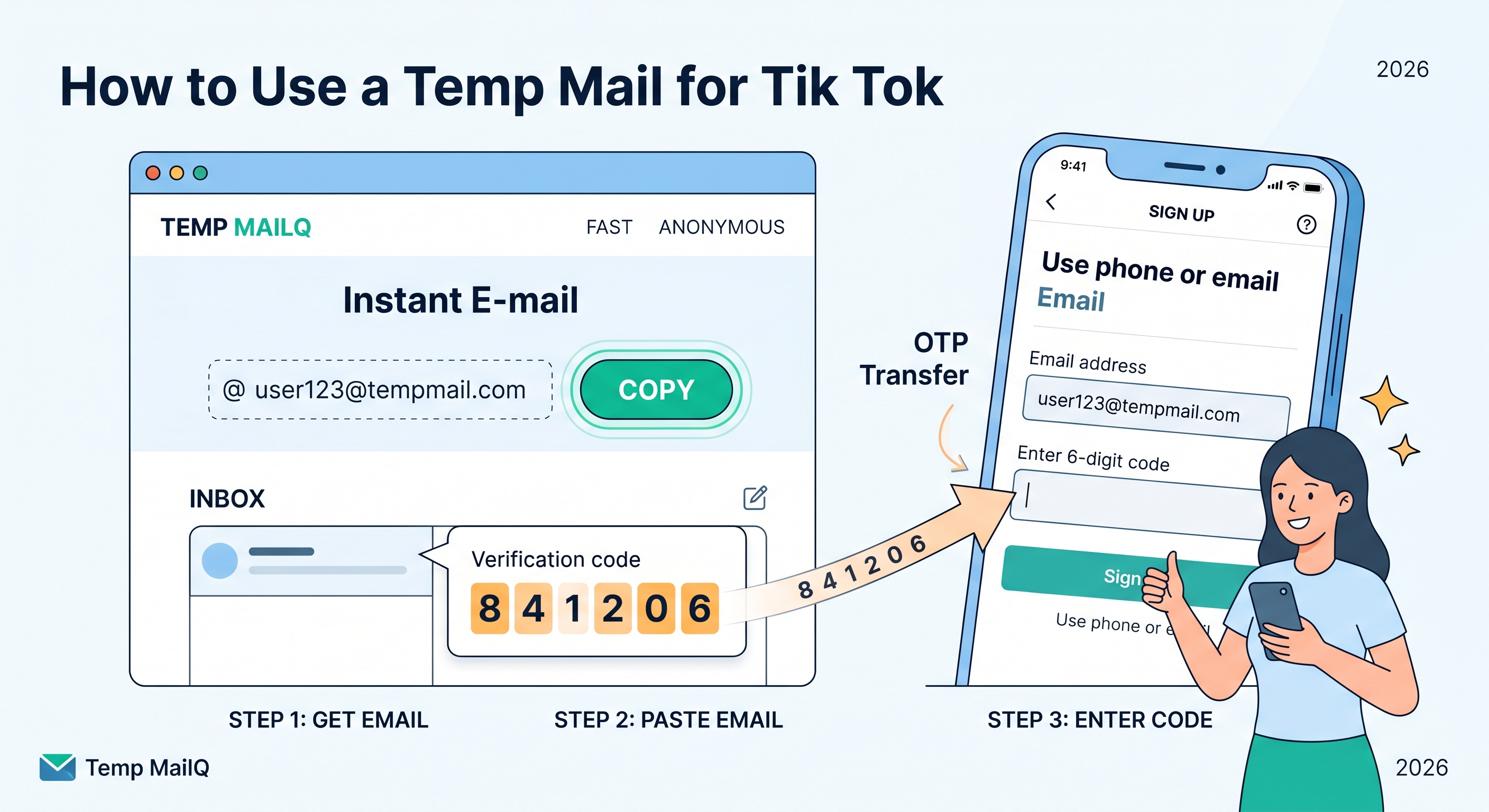
Open a new tab and head over to Temp MailQ. The platform automatically generates a unique, anonymous email address for you instantly. Click the "Copy" button to copy the address to your clipboard. Do not close this tab, as you will need it to receive the verification code!
Step 2: Start the TikTok Registration Process
Open the TikTok app or visit the official TikTok website on your browser. Click on the "Sign Up" button. When prompted with registration options, choose "Use phone or email".
Step 3: Enter Your Birthday and the Temp Mail
Select your date of birth (make sure it meets the platform's age requirements) and click on the "Email" tab instead of phone. Paste the temporary email address you copied from Temp MailQ into the email field and create a secure password.
Step 4: Retrieve the Verification OTP Code
TikTok will send a 6-digit verification code to the email address provided. Switch back to your Temp MailQ tab. Look at the built-in, real-time inbox. Within seconds, you will see a new email arriving from TikTok. Click on it to reveal your One-Time Password (OTP).
Step 5: Complete the Sign-Up
Enter the 6-digit code on TikTok’s sign-up page, choose your new username, and hit finish. Congratulations! Your private TikTok account is now ready to use.
Is It Safe to Use a Temporary Email on Social Media?
Yes, it is entirely safe for creating casual browsing accounts. Services like Temp MailQ ensure that your temporary mailbox is secure and only accessible during your active session. However, keep in mind that since these emails are temporary, if you lose access to your account or log out permanently, recovering it through email might be difficult. For permanent personal profiles or content creator accounts where you plan to build a massive following, we recommend linking a secure fallback method later on.
Ready to browse TikTok without boundaries? Head over to Temp MailQ and get your instant e-mail now!